← 返回列表
🔗 原文
用单个二进制文件、单个URL和零配置获取远程终端
Get a Remote Terminal With One Binary, One URL, and Zero Config

Launch a single static binary executable, send someone a QR code or URL (or failing that, text a numerical code or shout it across a room), and they’ll get an encrypted terminal in their browser. No VPN, no port forwarding, no firewall modifications, and no account setup required. It’s BitBang by [Rich LeGrand], and there is a lot to go through in this one.

The best part? It’s not actually limited to just firing off a terminal. It’s a whole open framework for establishing an encrypted peer-to-peer connection between two systems over WebRTC without needing either a trusted central authority, or any special network configuration.
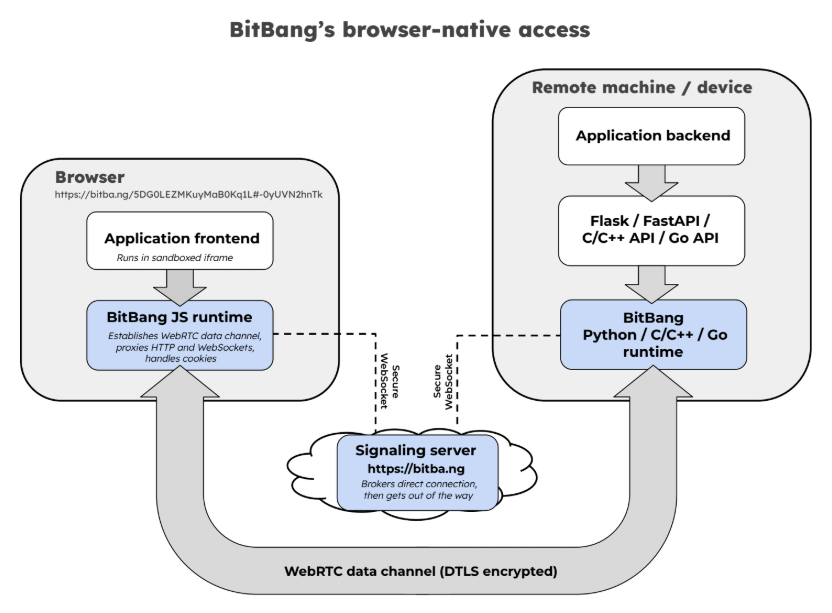
The signaling server brokers the handshake, then has no further involvement. By design, it couldn’t see application data even if it wanted to. Click to enlarge.

Opening a remote terminal, transferring files, or accessing web apps on a remote machine’s network is done with bitbang-cli, an implementation of BitBang focused on providing simple, zero-config remote access.

Before we go on, we want to mention that BitBang does require a lightweight, trustless signaling server only to broker the initial connection, but more on that in a moment.

On the machine to be shared, one first downloads the binary. Easiest way to do that is to go to bitba.ng and download manually, or copy and paste the one-line installer to auto-detect one’s system, download the correct release, and verify the checksum.

After the binary is downloaded, simply run it in a terminal and receive a QR code to scan, a URL to copy & paste, or a numerical code if those are inconvenient. One the remote side, one accesses the signaling server and the connection is made — one gets a terminal on the target machine open in the browser tab, with added options for file sharing and accessing web applications on the target network.

The signaling server isn’t involved in authentication or encryption, and couldn’t see private data between the two ends even if it wanted to. Prefer not to use someone else’s regardless? Run your own local instance with bitbang-server.

Originally developed as an easy way to securely make telepresence robots reachable over the Internet with nothing more than a QR code, today it’s a whole framework.

It includes not just the remote-access tool mentioned above, but also a BitBang Octoprint plugin for cloud-free remote access to 3D printers, and bitbang-python is a library for turning local Python web applications into a URL that can be opened from anywhere.

We’re sure some of you are getting more than a few ideas from this. If it lets you bring a project over the finish line, let us know on our tips line.

🤖 AI 总结
只需运行一个静态二进制文件,通过二维码、URL或数字代码分享,即可零配置获得远程终端,简化连接过程。

Launch a single static binary executable, send someone a QR code or URL (or failing that, text a numerical code or shout it across a room), and they’ll get an encrypted terminal in their browser. No VPN, no port forwarding, no firewall modifications, and no account setup required. It’s BitBang by [Rich LeGrand], and there is a lot to go through in this one.

The best part? It’s not actually limited to just firing off a terminal. It’s a whole open framework for establishing an encrypted peer-to-peer connection between two systems over WebRTC without needing either a trusted central authority, or any special network configuration.

The signaling server brokers the handshake, then has no further involvement. By design, it couldn’t see application data even if it wanted to. Click to enlarge.

Opening a remote terminal, transferring files, or accessing web apps on a remote machine’s network is done with bitbang-cli, an implementation of BitBang focused on providing simple, zero-config remote access.

Before we go on, we want to mention that BitBang does require a lightweight, trustless signaling server only to broker the initial connection, but more on that in a moment.

On the machine to be shared, one first downloads the binary. Easiest way to do that is to go to bitba.ng and download manually, or copy and paste the one-line installer to auto-detect one’s system, download the correct release, and verify the checksum.

After the binary is downloaded, simply run it in a terminal and receive a QR code to scan, a URL to copy & paste, or a numerical code if those are inconvenient. One the remote side, one accesses the signaling server and the connection is made — one gets a terminal on the target machine open in the browser tab, with added options for file sharing and accessing web applications on the target network.

The signaling server isn’t involved in authentication or encryption, and couldn’t see private data between the two ends even if it wanted to. Prefer not to use someone else’s regardless? Run your own local instance with bitbang-server.

Originally developed as an easy way to securely make telepresence robots reachable over the Internet with nothing more than a QR code, today it’s a whole framework.

It includes not just the remote-access tool mentioned above, but also a BitBang Octoprint plugin for cloud-free remote access to 3D printers, and bitbang-python is a library for turning local Python web applications into a URL that can be opened from anywhere.

We’re sure some of you are getting more than a few ideas from this. If it lets you bring a project over the finish line, let us know on our tips line.

原文
Get a Remote Terminal With One Binary, One URL, and Zero Config

Launch a single static binary executable, send someone a QR code or URL (or failing that, text a numerical code or shout it across a room), and they’ll get an encrypted terminal in their browser. No VPN, no port forwarding, no firewall modifications, and no account setup required. It’s BitBang by [Rich LeGrand], and there is a lot to go through in this one.

The best part? It’s not actually limited to just firing off a terminal. It’s a whole open framework for establishing an encrypted peer-to-peer connection between two systems over WebRTC without needing either a trusted central authority, or any special network configuration.

The signaling server brokers the handshake, then has no further involvement. By design, it couldn’t see application data even if it wanted to. Click to enlarge.

Opening a remote terminal, transferring files, or accessing web apps on a remote machine’s network is done with bitbang-cli, an implementation of BitBang focused on providing simple, zero-config remote access.

Before we go on, we want to mention that BitBang does require a lightweight, trustless signaling server only to broker the initial connection, but more on that in a moment.

On the machine to be shared, one first downloads the binary. Easiest way to do that is to go to bitba.ng and download manually, or copy and paste the one-line installer to auto-detect one’s system, download the correct release, and verify the checksum.

After the binary is downloaded, simply run it in a terminal and receive a QR code to scan, a URL to copy & paste, or a numerical code if those are inconvenient. One the remote side, one accesses the signaling server and the connection is made — one gets a terminal on the target machine open in the browser tab, with added options for file sharing and accessing web applications on the target network.

The signaling server isn’t involved in authentication or encryption, and couldn’t see private data between the two ends even if it wanted to. Prefer not to use someone else’s regardless? Run your own local instance with bitbang-server.

Originally developed as an easy way to securely make telepresence robots reachable over the Internet with nothing more than a QR code, today it’s a whole framework.

It includes not just the remote-access tool mentioned above, but also a BitBang Octoprint plugin for cloud-free remote access to 3D printers, and bitbang-python is a library for turning local Python web applications into a URL that can be opened from anywhere.

We’re sure some of you are getting more than a few ideas from this. If it lets you bring a project over the finish line, let us know on our tips line.

中文翻译
用单个二进制文件、单个URL和零配置获取远程终端

启动一个静态二进制可执行文件,向某人发送一个二维码或URL(如果不行,就发一条数字代码或隔着房间喊出来),他们就能在浏览器中获取一个加密终端。无需VPN、无需端口转发、无需修改防火墙,也无需设置账户。这是[Rich LeGrand] 开发的 BitBang,其中有很多值得介绍的内容。

最棒的是?它实际上并不局限于启动一个终端。它是一个完整的开放框架,用于通过WebRTC在两个系统之间建立加密的点对点连接,既不需要可信的中心权威机构,也不需要任何特殊的网络配置。

信令服务器负责协商握手,之后便不再参与。从设计上讲,即使它想看到应用数据也看不到。点击放大。

打开远程终端、传输文件或访问远程机器网络上的Web应用,通过bitbang-cli即可完成,这是BitBang的一个实现,专注于提供简单、零配置的远程访问。

在继续之前,我们想提一下,BitBang确实需要一个轻量级的无需信任的信令服务器,仅用于协商初始连接,稍后我们会详细说明。

在要被共享的机器上,首先下载二进制文件。最简单的方法是访问bitba.ng手动下载,或者复制粘贴一行安装命令,自动检测系统、下载正确的版本并验证校验和。

下载二进制文件后,只需在终端中运行它,即可收到一个可扫描的二维码、一个可复制粘贴的URL,或者如果这些不方便时提供一个数字代码。在远程端,访问信令服务器即可建立连接——您将在浏览器标签页中打开目标机器上的终端,并带有文件共享和访问目标网络上Web应用的可选功能。

信令服务器不参与身份验证或加密,即使它愿意也无法看到两端之间的私有数据。不想用别人的服务器?使用bitbang-server运行自己的本地实例。

最初开发它的目的是作为一种简单的方式,仅凭一个二维码就能让远程临场机器人在互联网上可达,如今它已发展成一个完整的框架。

它不仅包含上述远程访问工具,还包括一个用于无云远程访问3D打印机的BitBang Octoprint插件,而bitbang-python是一个库,用于将本地Python Web应用变成可以从任何地方打开的URL。

我们确信你们中的一些人已经从这得到了不少灵感。如果它能让您的项目顺利完成,请通过我们的提示热线告诉我们