← 返回列表
🔗 原文
FlipBuddy就是Borg,你将被同化
FlipBuddy is Borg, You Will Be Assimilated

When you think about it, time is all we’ve really got. Where to go from there is ultimately up to you. Maybe you use an app to track every task, or just go with the onboard timer. But that can be a lot of steps to begin with, and then the phone screen goes dark again. For some people, the whole out of sight, out of mind thing will kick in. At worst, you get distracted, start doing something else, and then feel guilty and frustrated when the timer starts going off.
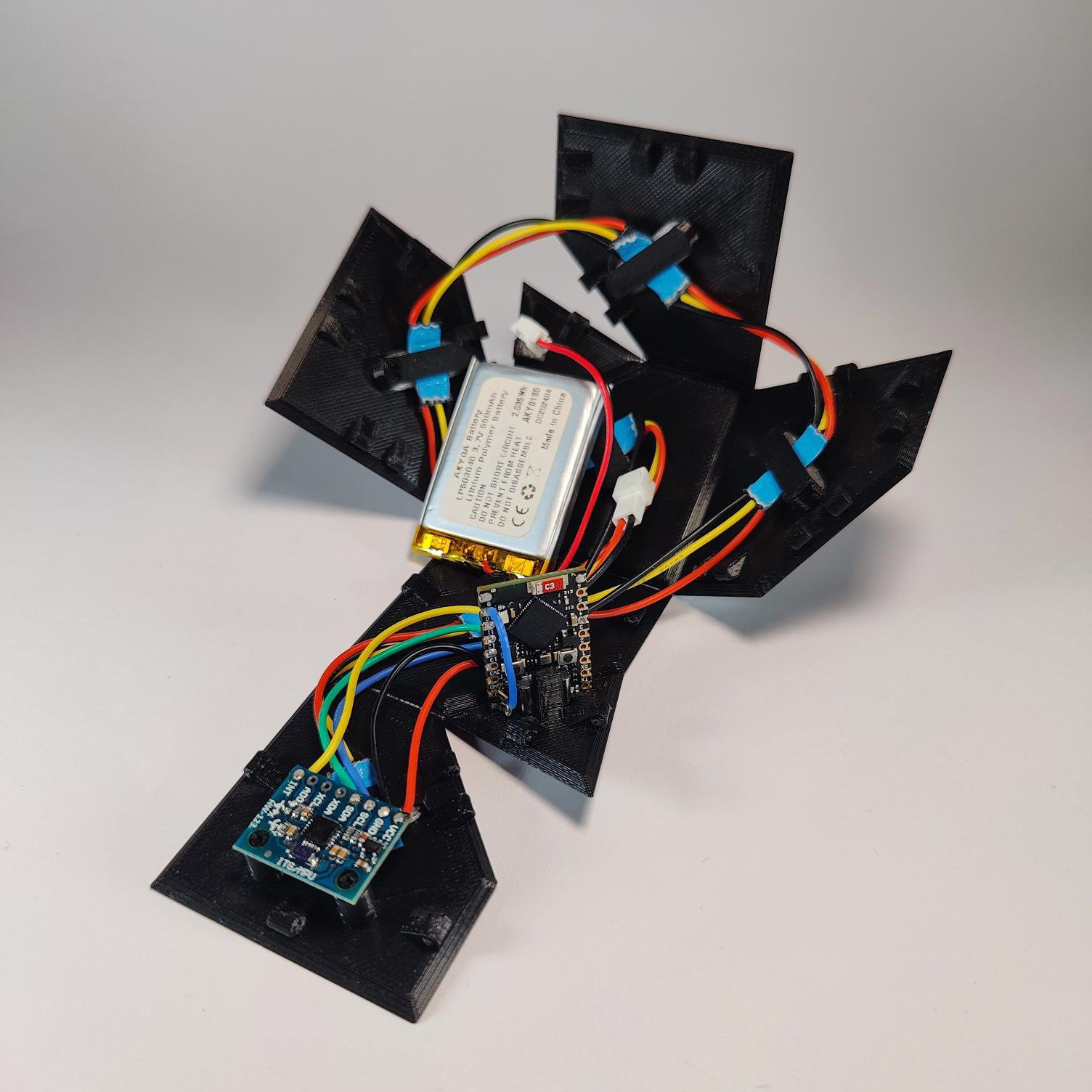
The guts of FlipBuddy inside the unfurled enclosure.But there’s hope for us visual simpletons, and the purveyor of that hope is [Edris] of Ponderly Robotics. You see, [Edris] created an extremely easy-to-use timer that looks like something you’d find on Captain Picard’s desk as a token of defeating the Borg. But the affably-named FlipBuddy is far more useful than that description implies.

[Edris] uses the open-source FlipBuddy every day, and swears by its simplicity. The point is accessibility, and respect for privacy. That said, there’s a companion app to provide insight.

Basically, you assign a task to each cube face. Choose one, and place the cube with that side facing up. FlipBuddy wakes up, connects to WiFi, and then pushes your session to the cloud, bypassing the need for your phone.

Time to switch tasks? Just put the new side face up. When you’re done for the day, use the stop face, which we’re hoping means to set it on the knocked-off corner.

You don’t need much to make FlipBuddy come to life. [Edris] used an ESP32 (an S3 SuperMini or similar will work), an MPU6050, six WS2812B LEDs, and a 3.7 V Li-Po cell. The beautiful, 3D printed origami mesh enclosure prints as a single, flat piece, and you get to fold it up around the internals and make your new buddy come to life.

Part of the point of FlipBuddy is that it can become as intuitive as punching a chess clock. So if it’s buttons you’re after, check out this simple Pomodoro timer.

🤖 AI 总结
文章以“时间是我们仅有的”为引,警示时间追踪应用FlipBuddy会像Borg集体般同化用户,提醒勿让工具掌控自己的生活。

When you think about it, time is all we’ve really got. Where to go from there is ultimately up to you. Maybe you use an app to track every task, or just go with the onboard timer. But that can be a lot of steps to begin with, and then the phone screen goes dark again. For some people, the whole out of sight, out of mind thing will kick in. At worst, you get distracted, start doing something else, and then feel guilty and frustrated when the timer starts going off.

The guts of FlipBuddy inside the unfurled enclosure.But there’s hope for us visual simpletons, and the purveyor of that hope is [Edris] of Ponderly Robotics. You see, [Edris] created an extremely easy-to-use timer that looks like something you’d find on Captain Picard’s desk as a token of defeating the Borg. But the affably-named FlipBuddy is far more useful than that description implies.

[Edris] uses the open-source FlipBuddy every day, and swears by its simplicity. The point is accessibility, and respect for privacy. That said, there’s a companion app to provide insight.

Basically, you assign a task to each cube face. Choose one, and place the cube with that side facing up. FlipBuddy wakes up, connects to WiFi, and then pushes your session to the cloud, bypassing the need for your phone.

Time to switch tasks? Just put the new side face up. When you’re done for the day, use the stop face, which we’re hoping means to set it on the knocked-off corner.

You don’t need much to make FlipBuddy come to life. [Edris] used an ESP32 (an S3 SuperMini or similar will work), an MPU6050, six WS2812B LEDs, and a 3.7 V Li-Po cell. The beautiful, 3D printed origami mesh enclosure prints as a single, flat piece, and you get to fold it up around the internals and make your new buddy come to life.

Part of the point of FlipBuddy is that it can become as intuitive as punching a chess clock. So if it’s buttons you’re after, check out this simple Pomodoro timer.

原文
FlipBuddy is Borg, You Will Be Assimilated

When you think about it, time is all we’ve really got. Where to go from there is ultimately up to you. Maybe you use an app to track every task, or just go with the onboard timer. But that can be a lot of steps to begin with, and then the phone screen goes dark again. For some people, the whole out of sight, out of mind thing will kick in. At worst, you get distracted, start doing something else, and then feel guilty and frustrated when the timer starts going off.

The guts of FlipBuddy inside the unfurled enclosure.But there’s hope for us visual simpletons, and the purveyor of that hope is [Edris] of Ponderly Robotics. You see, [Edris] created an extremely easy-to-use timer that looks like something you’d find on Captain Picard’s desk as a token of defeating the Borg. But the affably-named FlipBuddy is far more useful than that description implies.

[Edris] uses the open-source FlipBuddy every day, and swears by its simplicity. The point is accessibility, and respect for privacy. That said, there’s a companion app to provide insight.

Basically, you assign a task to each cube face. Choose one, and place the cube with that side facing up. FlipBuddy wakes up, connects to WiFi, and then pushes your session to the cloud, bypassing the need for your phone.

Time to switch tasks? Just put the new side face up. When you’re done for the day, use the stop face, which we’re hoping means to set it on the knocked-off corner.

You don’t need much to make FlipBuddy come to life. [Edris] used an ESP32 (an S3 SuperMini or similar will work), an MPU6050, six WS2812B LEDs, and a 3.7 V Li-Po cell. The beautiful, 3D printed origami mesh enclosure prints as a single, flat piece, and you get to fold it up around the internals and make your new buddy come to life.

Part of the point of FlipBuddy is that it can become as intuitive as punching a chess clock. So if it’s buttons you’re after, check out this simple Pomodoro timer.

中文翻译
FlipBuddy就是Borg,你将被同化

仔细想想,时间才是我们真正拥有的一切。接下来何去何从,最终取决于你自己。也许你会用一个应用来追踪每项任务,或者干脆使用内置计时器。但一开始就要经历很多步骤,然后手机屏幕又会再次变暗。对某些人来说,“眼不见,心不烦”的那一套会开始起作用。最糟糕的情况下,你会分心,开始做别的事情,然后当计时器响起时,感到内疚和沮丧。

The guts of FlipBuddy inside the unfurled enclosure.但对于我们这些视觉上的简单主义者来说,还是有希望的,而带来这份希望的是Ponderly Robotics的[Edris]。你看,[Edris]创造了一款极其易用的计时器,它看起来像是皮卡德舰长桌上作为击败博格人纪念品的东西。不过,这个亲和力十足的FlipBuddy可比这个描述有用得多。

[Edris]每天都会使用这个开源的FlipBuddy,并且非常推崇它的简洁性。其重点在于易用性和对隐私的尊重。话虽如此,还有一个配套应用可以提供更多洞察。

基本上,你为立方体的每个面分配一个任务。选择一个面,然后将立方体的那一面朝上放置。FlipBuddy会醒来,连接到WiFi,然后将你的工作会话推送到云端,无需使用手机。

需要切换任务了?只需将新的一面朝上即可。当你完成一天的工作后,使用停止面——我们希望这意味着将立方体放在被磕掉的角上。

要让FlipBuddy活起来,你不需要太多东西。[Edris]使用了一个ESP32(S3 SuperMini或类似型号均可)、一个MPU6050、六颗WS2812B LED,以及一块3.7V锂聚合物电池。这个漂亮的3D打印折纸网状外壳以单片平面形式打印,你可以把它折叠包裹住内部零件,让你的新伙伴焕发生机。

FlipBuddy的部分意义在于,它可以变得像按棋钟一样直观。所以如果你想要按键操作,不妨看看这个简单的番茄钟计时器