← 返回列表
🔗 原文
Jenny的日常系统:KolibriOS 0.7.7
Jenny’s Daily Drivers: KolibriOS 0.7.7

It’s a fact of life when starting a computer, that booting into whatever operating system you use will take a while. Mine takes somewhere around 30 seconds, and yours probably does too. There has always been the promise of something faster just around the corner, but somehow the OS just keeps getting a little bigger. Perhaps the only computer with a disk based operating system I have ever owned which bucked this trend was a Commodore Amiga, and that machine’s booting speed was achieved by keeping most of its OS in a ROM. The subject of today’s Daily Drivers takes the idea of a long boot time and shreds it, leaving an experience more akin to that Amiga of old. It’s called KolibriOS, it’s small enough to run from a floppy disk if you want it to, it’s lightweight, and fast as lightning. It achieves this feat by being written entirely in assembly language, and it exists as a free fork of the earlier MenuetOS which moved to a proprietary licence in its 64 bit version. I downloaded the ISO file, and gave it a spin.
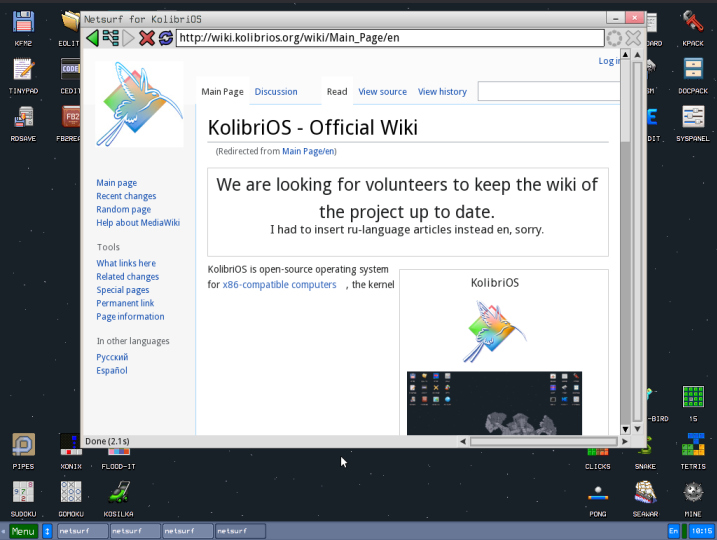
The KolibriOS GUI with the Netsurf browser showing the KolibriOS wiki.
You can surf the web with NetSurf, but not the encrypted web.

The minimum system requirements for KolibriOS are meagre, 1Mb of disk space, 8Mb of RAM, and a 586-class 32-bit processor. On a 2020s ThinkPad it boots in the proverbial blink of an eye, and drops immediately into a GUI desktop. It has the slightly pixelated look of a 1990s machine, there’s none of the anti-aliasing we’re used to today going on there. Installed software ranges from a set of games, emulators, graphics editors and viewers, internet software including the Webview and Netsurf web browsers, and assembly software development.

The immediate impression is of a mature and useful operating system, without any crashes or blue screens, and with applications that load on a dime. Unfortunately though, despite all the competence I can’t call it a Daily Driver by my definition of being able to write for Hackaday, because the web browser doesn’t support https. Immediately the majority of the modern Internet is off-limits, including this site. This changes the parameters of my review and I can no longer proceed as I normally would, but it doesn’t end it. Something this polished deserves a while to play around.
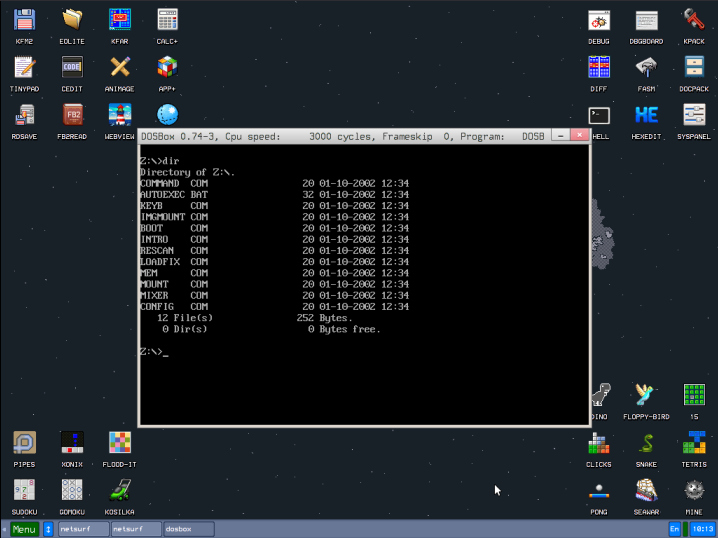
The KolibriOS desktop, with the DOSBox emulator running.
DOSBox gives this another dimension.

Diving into the command prompt gives a feeling somewhere between a UNIX style OS and DOS, as the commands are UNIX-style but their output feels more DOS-like. Navigating around the disk I’m immediately struck by how small the executables are due to their being written in assembly language. The only exceptions are those applications ported from outside such as Netsurf or DOSBox, which is hardly surprising.

Back in the 1990s there was a single-floppy demo of the QNX operating system that packed the OS, a GUI, and a reasonable web browser for the day. At the time it was mind-blowing to see so much in such a small space, and I am reminded of that QNX demo when I use KolibriOS. This is evidently a useful OS, and I am only sad that it doesn’t support the one thing that would make it useful for my purposes. If you have an older machine I can see it would make a great emulator platform though, and since one of the emulators gives you DOS it’s likely it could also run a lot of useful things from that OS. It will never offer the flexibility on a 32-bit laptop that a Linux distro such as SliTaz can, but on the other hand that low system requirement means it could make a much older 32-bit machine into something useful. If you’ve got some ancient hardware and fancy something new, give it a try!

🤖 AI 总结
Jenny的每日驱动:KolibriOS 0.7.7启动极快,解决传统操作系统启动慢的问题,提升使用效率。

It’s a fact of life when starting a computer, that booting into whatever operating system you use will take a while. Mine takes somewhere around 30 seconds, and yours probably does too. There has always been the promise of something faster just around the corner, but somehow the OS just keeps getting a little bigger. Perhaps the only computer with a disk based operating system I have ever owned which bucked this trend was a Commodore Amiga, and that machine’s booting speed was achieved by keeping most of its OS in a ROM. The subject of today’s Daily Drivers takes the idea of a long boot time and shreds it, leaving an experience more akin to that Amiga of old. It’s called KolibriOS, it’s small enough to run from a floppy disk if you want it to, it’s lightweight, and fast as lightning. It achieves this feat by being written entirely in assembly language, and it exists as a free fork of the earlier MenuetOS which moved to a proprietary licence in its 64 bit version. I downloaded the ISO file, and gave it a spin.

The KolibriOS GUI with the Netsurf browser showing the KolibriOS wiki.
You can surf the web with NetSurf, but not the encrypted web.

The minimum system requirements for KolibriOS are meagre, 1Mb of disk space, 8Mb of RAM, and a 586-class 32-bit processor. On a 2020s ThinkPad it boots in the proverbial blink of an eye, and drops immediately into a GUI desktop. It has the slightly pixelated look of a 1990s machine, there’s none of the anti-aliasing we’re used to today going on there. Installed software ranges from a set of games, emulators, graphics editors and viewers, internet software including the Webview and Netsurf web browsers, and assembly software development.

The immediate impression is of a mature and useful operating system, without any crashes or blue screens, and with applications that load on a dime. Unfortunately though, despite all the competence I can’t call it a Daily Driver by my definition of being able to write for Hackaday, because the web browser doesn’t support https. Immediately the majority of the modern Internet is off-limits, including this site. This changes the parameters of my review and I can no longer proceed as I normally would, but it doesn’t end it. Something this polished deserves a while to play around.

The KolibriOS desktop, with the DOSBox emulator running.
DOSBox gives this another dimension.

Diving into the command prompt gives a feeling somewhere between a UNIX style OS and DOS, as the commands are UNIX-style but their output feels more DOS-like. Navigating around the disk I’m immediately struck by how small the executables are due to their being written in assembly language. The only exceptions are those applications ported from outside such as Netsurf or DOSBox, which is hardly surprising.

Back in the 1990s there was a single-floppy demo of the QNX operating system that packed the OS, a GUI, and a reasonable web browser for the day. At the time it was mind-blowing to see so much in such a small space, and I am reminded of that QNX demo when I use KolibriOS. This is evidently a useful OS, and I am only sad that it doesn’t support the one thing that would make it useful for my purposes. If you have an older machine I can see it would make a great emulator platform though, and since one of the emulators gives you DOS it’s likely it could also run a lot of useful things from that OS. It will never offer the flexibility on a 32-bit laptop that a Linux distro such as SliTaz can, but on the other hand that low system requirement means it could make a much older 32-bit machine into something useful. If you’ve got some ancient hardware and fancy something new, give it a try!

原文
Jenny’s Daily Drivers: KolibriOS 0.7.7

It’s a fact of life when starting a computer, that booting into whatever operating system you use will take a while. Mine takes somewhere around 30 seconds, and yours probably does too. There has always been the promise of something faster just around the corner, but somehow the OS just keeps getting a little bigger. Perhaps the only computer with a disk based operating system I have ever owned which bucked this trend was a Commodore Amiga, and that machine’s booting speed was achieved by keeping most of its OS in a ROM. The subject of today’s Daily Drivers takes the idea of a long boot time and shreds it, leaving an experience more akin to that Amiga of old. It’s called KolibriOS, it’s small enough to run from a floppy disk if you want it to, it’s lightweight, and fast as lightning. It achieves this feat by being written entirely in assembly language, and it exists as a free fork of the earlier MenuetOS which moved to a proprietary licence in its 64 bit version. I downloaded the ISO file, and gave it a spin.

The KolibriOS GUI with the Netsurf browser showing the KolibriOS wiki.
You can surf the web with NetSurf, but not the encrypted web.

The minimum system requirements for KolibriOS are meagre, 1Mb of disk space, 8Mb of RAM, and a 586-class 32-bit processor. On a 2020s ThinkPad it boots in the proverbial blink of an eye, and drops immediately into a GUI desktop. It has the slightly pixelated look of a 1990s machine, there’s none of the anti-aliasing we’re used to today going on there. Installed software ranges from a set of games, emulators, graphics editors and viewers, internet software including the Webview and Netsurf web browsers, and assembly software development.

The immediate impression is of a mature and useful operating system, without any crashes or blue screens, and with applications that load on a dime. Unfortunately though, despite all the competence I can’t call it a Daily Driver by my definition of being able to write for Hackaday, because the web browser doesn’t support https. Immediately the majority of the modern Internet is off-limits, including this site. This changes the parameters of my review and I can no longer proceed as I normally would, but it doesn’t end it. Something this polished deserves a while to play around.

The KolibriOS desktop, with the DOSBox emulator running.
DOSBox gives this another dimension.

Diving into the command prompt gives a feeling somewhere between a UNIX style OS and DOS, as the commands are UNIX-style but their output feels more DOS-like. Navigating around the disk I’m immediately struck by how small the executables are due to their being written in assembly language. The only exceptions are those applications ported from outside such as Netsurf or DOSBox, which is hardly surprising.

Back in the 1990s there was a single-floppy demo of the QNX operating system that packed the OS, a GUI, and a reasonable web browser for the day. At the time it was mind-blowing to see so much in such a small space, and I am reminded of that QNX demo when I use KolibriOS. This is evidently a useful OS, and I am only sad that it doesn’t support the one thing that would make it useful for my purposes. If you have an older machine I can see it would make a great emulator platform though, and since one of the emulators gives you DOS it’s likely it could also run a lot of useful things from that OS. It will never offer the flexibility on a 32-bit laptop that a Linux distro such as SliTaz can, but on the other hand that low system requirement means it could make a much older 32-bit machine into something useful. If you’ve got some ancient hardware and fancy something new, give it a try!

中文翻译
Jenny的日常系统:KolibriOS 0.7.7

启动电脑时,我们通常都得等待操作系统加载完成,这是一个不争的事实。我的电脑大约需要30秒,你的可能也差不多。一直以来,总有人承诺更快的东西即将出现,但操作系统却似乎不断变得更大。或许我拥有过的、唯一打破这个趋势的磁盘操作系统电脑是Commodore Amiga,它之所以能快速启动,是因为大部分操作系统都固化在ROM中。今天《日常驱动》的主角彻底颠覆了长启动时间的想法,带来了更接近当年Amiga的体验。它叫KolibriOS,体积小到如果你愿意,甚至可以从软盘运行,轻量级,速度快如闪电。它通过完全用汇编语言编写实现了这一壮举,是早期MenuetOS的一个免费分支,后者在64位版本中转向了专有许可。我下载了ISO文件,并尝试了一下。

KolibriOS GUI 显示 NetSurf 浏览器打开 KolibriOS 维基页面。
可以用 NetSurf 上网,但无法访问加密网站。

KolibriOS 的最低系统要求非常低:1MB 磁盘空间、8MB 内存以及一颗 586 级 32 位处理器。在 2020 年代的 ThinkPad 上,它启动快如眨眼,并立即进入 GUI 桌面。它带有 90 年代机器的轻微像素感,完全没有我们今天习惯的抗锯齿效果。预装软件包括一系列游戏、模拟器、图形编辑器和查看器、互联网软件(如 Webview 和 NetSurf 浏览器)以及汇编软件开发工具。

第一印象是它是一个成熟且实用的操作系统,没有任何崩溃或蓝屏,应用程序瞬间就能加载。但遗憾的是,尽管它如此出色,我仍不能称其为“日常驱动”(按我的定义,即能用于为 Hackaday 撰写文章),因为它的网页浏览器不支持 https。这样一来,现代互联网的绝大部分内容(包括本站)都无法访问。这改变了我评测的衡量标准,我无法再按常规方式进行,但评测并未就此结束。如此精雕细琢的系统值得花些时间把玩一番。

KolibriOS 桌面,运行着 DOSBox 模拟器。
DOSBox 为其增添了另一层维度。

进入命令提示符后,感觉介于 UNIX 类操作系统和 DOS 之间,命令是 UNIX 风格的,但输出更像 DOS。浏览磁盘文件时,我立刻注意到可执行文件由于是用汇编语言编写的,体积非常小。唯一的例外是从外部移植的应用程序,比如 NetSurf 或 DOSBox,这并不奇怪。

回想 20 世纪 90 年代,QNX 操作系统曾有一个单软盘演示版,其中包含了操作系统、GUI 以及当时还算不错的网页浏览器。当时看到这么小的空间里容纳了这么多东西,令人叹为观止。使用 KolibriOS 时,我想起了那个 QNX 演示。这显然是一个有用的操作系统,只可惜它不支持那一个能让我将其用于自身目的的功能。如果你有一台较老的机器,我认为它完全可以成为一个出色的模拟器平台;而且由于其中一个模拟器提供了 DOS 环境,它很可能还能运行许多来自该操作系统的有用软件。它永远无法在 32 位笔记本上提供像 SliTaz 这样的 Linux 发行版 那样的灵活性,但另一方面,极低的系统需求意味着它能让一台更古老的 32 位机器变得有用。如果你有一些古董硬件并且想尝试新鲜事物,不妨试试看!